Loan Calculator
Apply for a loan today with interest rates that suit you! To ensure you apply for the right loan product, click on ‘Our Loans’ above for eligibility and conditions.
Maximum Loan Term :

12.68%
12.68%
12.68%
This calculator is for illustrative purposes only, to give you, the borrower, an overview of the potential cost of borrowing. The Credit Union, or any of its staff, cannot be held responsible for any errors. Please note that this calculator only provides an indicative quote and actual repayments may vary.
Our Services
We offer a range of services to our valued members

Savings
Whether you’re saving for something in the future or just for a ‘rainy day’, regular saving is a good idea. Regular saving with your credit union is an even better idea.
Learn more
Loans
Our loans have straightforward terms and conditions, do not carry any hidden fees or charges, and are offered with flexible repayment options.
Learn more
Insurance
Get peace of mind knowing your money is safe with your credit union. Life Savings, Loan Protection and Death Benefit Insurance available.
Learn more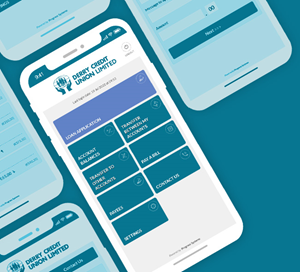

Mobile Banking On-The-Go
- Secure Member Login
- Check your account balances On the Go
- Transfer funds between your own accounts
- Pay your bills
Latest News

ILCU Art Competition Prize-giving - Local Stage hosted by Derry Credit Union
The family, friends, teachers and principals of this year's 46 winning artists joined representatives from the four top schools, and Derry Credit Union personnel for the 2023 ILCU Art Competition prize-giving.
Read More
Aodhan and Caomhan Place the baby Jesus in the Crib
Thank you to Aodhan and Caomhan who placed the baby Jesus in our Christmas crib today. Aodhan and Caomhan are the grandchildren of Raymond and Agnes McCourt, nee Hume.
Read More
Member Service Personnel Recruitment
We are currently recruiting for 2 Member Service Personnel - permanent positions. For full details and to request an application pack, please email recruitment@derrycu.com or call into our reception desk at Abbey Street.
Read More
2023 Young People's Awards Booklet
In March 2023, we celebrated young people from across the city who were nominated for our Young People's Awards by their schools, peers, friends and families for their contribution, generosity and the example they set for others.
Read More
The ILCU 2024 Schools Quiz is launched!
Derry Credit Union will host the local stage of the ILCU Schools Quiz on Monday, 29th January, at 7.00 pm in St Mary's College, Northland Road, Derry.
Read More
Member Notice: Loan Applications
We know how important your loan application is to you. Be assured that our Loans Department is busy processing loan applications.
Read More
The Passing of our Colleague Eamon Cassidy
It is with great sadness that we note the passing of our dear friend and colleague Eamon.
Read More
2023 Annual Report and Audited Accounts
Thank you to all our members who attended our 2023 AGM last night.
Read More
Social Enterprise NI Successes!
Derry Credit Union was awarded winner in the Best Credit Union (assets over £25 million) and Community Wealth Building categories at the Social Enterprise NI Awards on Friday, 27th October.
Read More
We are seeking to appoint a Senior Officer, Cash & Banking Department
Derry Credit Union continues to expand and grow in our common bond areas, BT47 and BT48.
Read MoreOur December Numbers
It is our ambition to achieve a growing membership in control of their finances, strengthening the financial well-being of our communities, by responsibly offering easy to access, low-cost credit to our members.